Many users confuse cancelling a subscription, unsubscribing from emails, and deleting an account inside the Rise Guide app. These three actions sound similar, but they actually do very different things. Because of this confusion, users sometimes take the wrong action when they want to stop being charged or stop receiving messages.
This misunderstanding can lead to accidental renewals, continued billing, or loss of account access when it was not intended. For example, some users unsubscribe from emails thinking that it will stop subscription payments, while others delete their account without cancelling billing first.
Because these actions are located in different parts of the product or communication settings, it is easy to assume that they control the same thing. In reality, each option is designed to manage a specific part of the user experience. One controls billing, another controls communication preferences, and another manages the account itself and the data connected to it.
This guide explains the difference between cancelling a subscription, unsubscribing from emails, and deleting your account. Understanding what each option does will help you choose the correct action and avoid unwanted charges related to your RiseGuide subscription.
For a full overview of the policies and detailed step by step instructions, you can also review RiseGuide’s official cancellation and refund policy. The goal of this guide is to clearly explain what happens with billing, account access, and your data depending on which action you choose.
Quick Comparison
| Action | Stops Billing | Stops Emails | Removes Account/Data | Keeps Access Until Period Ends |
| Cancel Subscription | Yes | No | No | Yes |
| Unsubscribe Emails | No | Yes | No | Yes |
| Delete Account | No* | Yes | Yes | No (after deletion) |
*Deleting your account does not automatically cancel RiseGuide subscription billing. You must cancel separately if an active subscription exists.
Cancel Subscription (Stops Billing)
If your main goal is to stop future charges, the correct action is to cancel your RiseGuide subscription. Cancelling a subscription stops the automatic renewal that normally occurs at the end of each billing cycle.
When a subscription remains active, it renews automatically according to the billing period that was selected when the purchase was made. Cancelling ensures that the subscription will not renew again after the current billing period finishes.
Many subscription services operate on an automatic renewal model. This means that unless the subscription is cancelled before the renewal date, the system will charge the next billing period automatically. Cancelling in advance ensures that the renewal will not occur and gives users full clarity about when their access will end.
It is also important to remember that cancelling does not mean the service stops immediately. Instead, the subscription simply continues until the paid period ends and then expires without charging again.
What Changes Immediately
- Auto renewal is turned off. The system will no longer schedule another charge for the next billing period.
- No future billing cycles will be charged after the current one ends. This means the subscription will expire naturally at the end of the paid period.
- You receive confirmation of cancellation. This confirmation is usually sent by email and serves as proof that the subscription was successfully cancelled.
What Stays Active
- Full access remains available until the end of your current paid billing period. Cancelling does not immediately remove access to features.
- Your account and saved data remain active. All information associated with the account continues to exist normally.
- You can still log in and use the app’s features until the subscription period expires. Access only ends after the billing period finishes.
If you are looking for how to cancel RiseGuide subscription, this is the action you need – not email “unsubscribe” and not account deletion.
Where to Cancel
If purchased directly through the website:
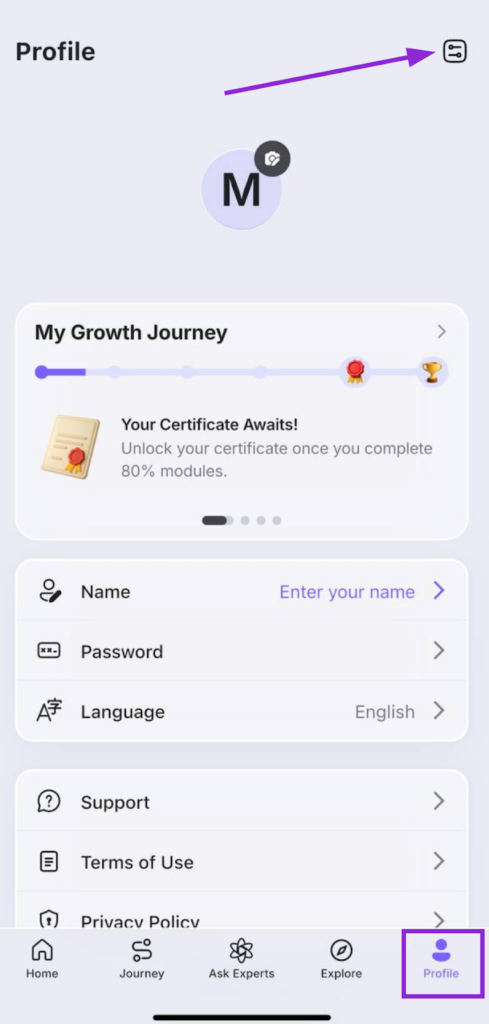
- Open the Rise Guide app
- Go to Profile
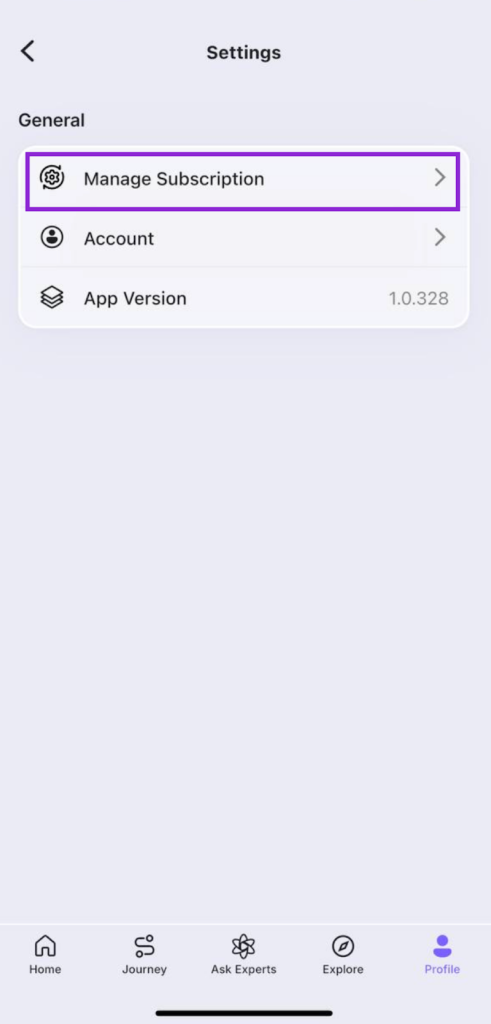
- Tap Settings
- Select Manage Subscription
- Choose Cancel Subscription
- Confirm
Once completed, you should receive confirmation that the subscription will not renew again.
If you subscribed through the App Store or Google Play:
- Cancel through your Apple/Google subscription settings.
- The app itself cannot override store-based billing.
Always verify where you originally purchased the RiseGuide subscription before cancelling. To check more details, follow this transparent step-by-step guide.
Unsubscribe (Stops Marketing Emails)
Unsubscribing is an option related only to communication preferences. It controls whether you receive marketing or promotional emails from RiseGuide.
Choosing to unsubscribe does not affect your subscription status or billing in any way. It only removes your email address from certain communication lists.
Marketing emails typically include product updates, feature announcements, promotional offers, or helpful tips related to using the platform. Some users prefer to stop receiving these types of messages while continuing to use the service normally.
Unsubscribing simply updates your communication preferences so that marketing emails are no longer delivered to your inbox. This setting only affects promotional communication and does not change any billing or account settings connected to your subscription.
Users often choose this option if they want fewer promotional messages but still want to keep using the app and its features.
You can unsubscribe by:
- Clicking the “Unsubscribe” link that appears at the bottom of marketing emails sent by RiseGuide.
- Contacting the support team by email at [email protected]
- Submitting a request through the contact page at riseguide.com/contact-us
After unsubscribing, you may still receive important service related emails such as billing confirmations or account notifications.
What Unsubscribe Does NOT Do
- It does not cancel RiseGuide subscription billing.
- It does not stop automatic renewal.
- It does not affect account access.
- It does not trigger a RiseGuide refund.
Delete Account (Data Removal)
Deleting your account is a separate process that focuses on removing your user profile and associated account data from the platform.
This action is usually chosen by users who no longer want their account information stored or who want their data removed from the service.
Account deletion focuses on the removal of the user profile and the data connected to it. Depending on the system and verification requirements, the deletion request may go through a confirmation process to ensure that the request was made by the account owner.
Because deleting an account removes access to the platform, users should ensure that all billing related actions are completed before requesting deletion.